
Your first login decides everything: whether you glide straight into your account or spend the next hour chasing OTPs and “something went wrong” pop-ups. Most beginners don’t get blocked by the app. They get blocked by tiny mistakes they didn’t even notice.
If you’re setting up a cricket ID to follow matches, track lines, or just keep your account ready for big nights, treat your login like your opening partnership. Solid basics early, fewer collapses later.
This guide breaks down big daddy game login in plain terms: what to do, what to avoid, how to stay secure, and what to check when the app acts moody on matchday.
You’ll finish knowing the fastest sign-in path, the security habits that matter, and the troubleshooting moves that actually work in India’s network-and-OTP reality.
Solid basics early
The “Sign In” Button Isn’t the Start — Your Device Is
Before you even type a number or username, get your phone ready like you’re prepping a pitch. A few quick checks prevent 80% of login drama.
Do this first (takes 60 seconds)
- Update the app from the official store or the official source you used earlier (avoid random APK links from group chats).
- Update your phone date and time to automatic. Wrong time breaks OTP verification quietly.
- Turn off VPN if you’re using one. Many logins get flagged when location jumps.
- Switch networks once if OTPs arrive late: Wi-Fi to mobile data, or vice versa.
- Clear background “battery saver” limits for the app so OTP screens don’t freeze mid-step.
That’s your base. Now the login itself becomes straightforward.
One Wrong Digit, One Locked Night: The Clean Login Path
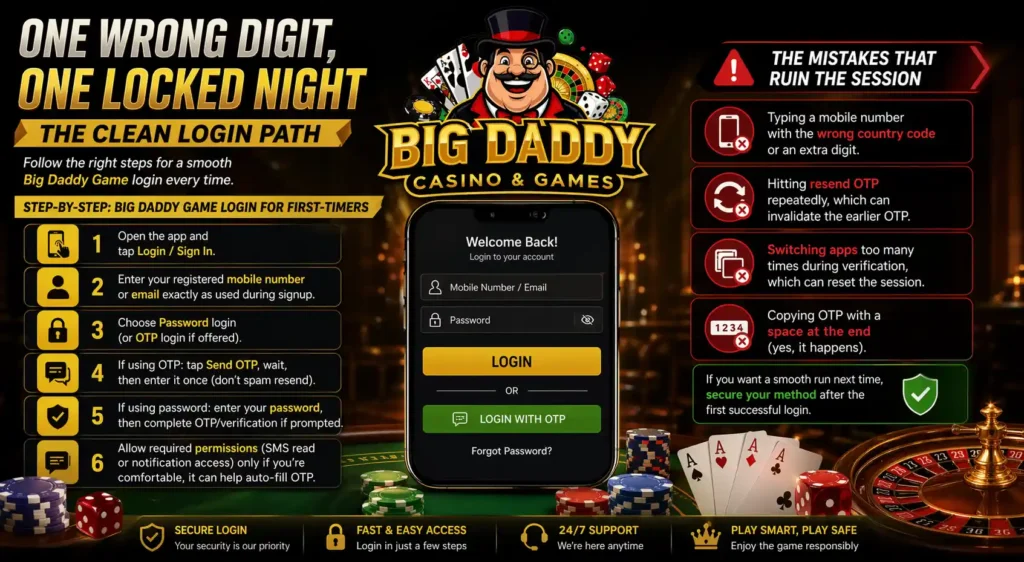
For most users, big daddy login follows a familiar pattern: phone/email, password, OTP. Here’s the beginner-friendly flow that avoids the common traps.
Step-by-step: big daddy game login for first-timers
- Open the app and tap Login / Sign In.
- Enter your registered mobile number or email exactly as used during signup.
- Choose Password login (or OTP login if offered).
- If using OTP: tap Send OTP, wait, then enter it once (don’t spam resend).
- If using password: enter your password, then complete OTP/verification if prompted.
- Allow required permissions (SMS read or notification access) only if you’re comfortable; it can help auto-fill OTP.
The mistakes that ruin the session
- Typing a mobile number with the wrong country code or an extra digit.
- Hitting resend OTP repeatedly, which can invalidate the earlier OTP.
- Switching apps too many times during verification, which can reset the session.
- Copying OTP with a space at the end (yes, it happens).
If you want a smooth run next time, secure your method after the first successful login.
The Password Habit That Hands Over Your Account
A lot of users treat passwords like a formality. Then they wonder why accounts get accessed from unknown devices. If you’re using big daddy login game on match nights, you need a password that isn’t guessable by someone who knows your cricket taste.
Build a password that’s hard to steal, easy to remember
Use a phrase style, not a single word:
- Example pattern: Word + symbol + year + cricket reference
- Something like: Blue@2026Wankhede! (make your own, not this one)
Rules worth following
- Don’t reuse your Gmail/Instagram password.
- Don’t use your name, birth year, or “India123”.
- Don’t save passwords in notes apps. Use a password manager if possible.
- Change it immediately if you logged in on a friend’s phone.
If the app supports it, enable an extra lock: device verification or 2-step prompts. That’s your helmet and guard.
OTP rescue checklist
OTPs Can Betray You at the Worst Time — Here’s Why
You’re ready for the chase, you tap OTP, and nothing arrives. Or it arrives after two minutes, right when you’ve already hit resend twice.
That’s not always the app. In India, OTP delivery depends on network congestion, SMS routing, and device settings.
OTP rescue checklist
- Wait a full 45–60 seconds before hitting resend.
- Check SMS spam folders (some phones filter automated codes).
- Restart your phone’s airplane mode: on for 10 seconds, then off.
- If your phone has dual SIM, ensure the registered SIM is active and set for SMS.
- On Android, verify the Messages app has permission to receive SMS.
If OTP still won’t arrive
Use password login (if available) or “try another method” options. If nothing works, stop trying repeatedly; too many attempts can trigger a temporary lock.
KYC Isn’t Glamorous — It’s the Gatekeeper
Many platforms now require KYC to unlock withdrawals, higher limits, or certain features. Beginners often ignore it until the day they need it.
If your account asks for verification, treat it like a rulebook, not a suggestion.
What to expect in verification steps
- Basic identity details (name, DOB)
- Document upload (often Aadhaar/PAN)
- Selfie or face verification in some cases
- Address confirmation in rare cases
The rookie errors
- Uploading blurred photos with glare.
- Using a document name that doesn’t match the registered name.
- Switching between multiple accounts with the same document details.
KYC policies vary, but the principle stays the same: clear data, matching details, and one stable account.
The usual culprits
The “Logged Out Again” Problem Nobody Warns You About
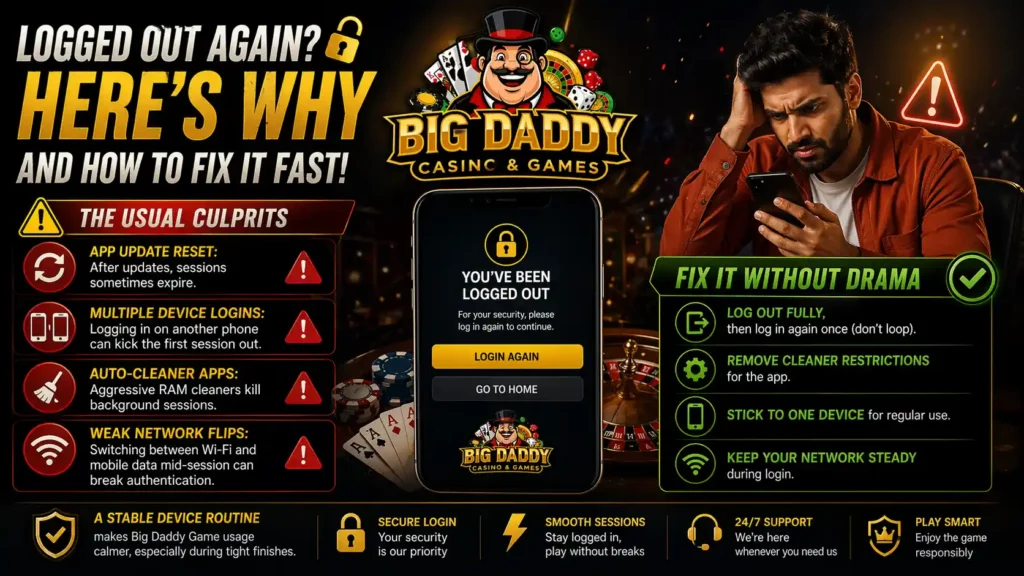
If you keep getting logged out, don’t blame bad luck. It’s usually one of these:
The usual culprits
- App update reset: after updates, sessions sometimes expire.
- Multiple device logins: logging in on another phone can kick the first session out.
- Auto-cleaner apps: aggressive RAM cleaners kill background sessions.
- Weak network flips: switching between Wi-Fi and mobile data mid-session can break authentication.
Fix it without drama
- Log out fully, then log in again once (don’t loop).
- Remove cleaner apps’ restrictions for the app.
- Stick to one device for regular use.
- Keep your network steady during login.
A stable device routine makes Bigdaddy Game usage calmer, especially during tight finishes.
Quick diagnosis
“Invalid Credentials” Isn’t Always Your Fault
That message is a classic. It could mean you typed something wrong. It could also mean the login method doesn’t match the signup method.
Quick diagnosis
- If you signed up with mobile, don’t try logging in with email unless the account links both.
- Check if you’re using spaces while pasting.
- Confirm caps lock isn’t altering the password.
- Try “Forgot Password” once instead of guessing repeatedly.
Resetting password the smart way
- Reset only from the official in-app option.
- Create a brand-new password you haven’t used before.
- Log in and then log out once to confirm the new password works cleanly.
A clean reset beats ten angry attempts.
Do these today
Security Moves That Feel Overkill — Until They Save You
If you’re using an online cricket ID, security is not extra. It’s basic hygiene.
Do these today
- Add a screen lock (PIN/fingerprint) on your phone.
- Turn on app lock if your phone offers it.
- Don’t share OTPs, not even “for a second”.
- Avoid logging in from public Wi-Fi at cafés or stations.
- Check for unknown device sessions if the app shows login history.
The biggest red flag
If someone asks you to “verify” your account by sharing OTP or password, it’s not verification. It’s takeover.
The Cricket ID Angle: What You’re Actually Setting Up
People throw around terms like “cricket ID” as if it’s one universal thing. In practice, it’s your account identity used to access cricket-related sections: match pages, markets, wallet, transaction history, or personalization.
What a beginner should set up properly
- Profile details (keep them consistent with your verification docs)
- Recovery method (email + phone if possible)
- Notification settings (too many alerts leads to missed OTPs)
- Device trust (if the app offers “trusted device” toggles)
This is the foundation that makes future logins a two-step routine, not a full rescue mission.
5-minute matchday prep
Matchday Checklist: Don’t Let Login Ruin Your Evening
When India’s playing or the IPL is on, login systems get hammered. Network traffic spikes, OTP delays rise, and people panic-tap every button.
5-minute matchday prep
- Log in before the toss.
- Keep one stable network.
- Charge your phone beyond 20%.
- Avoid switching accounts mid-match.
- If the app lags, close and reopen once, not ten times.
Simple habits save your mood.
Straight Answers: Beginners’ FAQ (No Drama)
| Can I use OTP login every time? | Yes, if the platform supports it reliably. Password login stays useful when SMS is delayed. |
| Why does it say “user not found”? | Usually you’re using the wrong login identifier (email vs mobile) or a different number than the one used at signup. |
| How long does a temporary lock last? | It varies by platform. The safest move is to stop attempts for a while and use the official recovery flow instead of brute-trying. |
| Is it safe to log in on a friend’s phone once? | It’s risky. If you must, log out completely after, remove saved credentials, and change your password later. |
| What if I changed my SIM? | Update your registered number through the app’s support process if available. Otherwise OTP delivery will keep failing. |
Recovery order that works
The “I Forgot Everything” Recovery Plan
If you forgot your password, lost your phone, or can’t access your OTP, don’t spiral. Follow a calm order.
Recovery order that works
- Try Forgot Password once.
- Use your backup email if the platform supports it.
- Verify your number is active and receiving SMS.
- If you changed devices, complete any device verification prompts.
- Use in-app support only after you’ve tried the official recovery tools.
The goal is one clean recovery attempt, not fifty half-attempts that trigger locks.
A Reality Check for India: Stay Legal, Stay Adult, Stay In Control
Cricket brings emotion. Apps bring convenience. Mix the two carefully.
- Follow your local rules and age requirements.
- Keep spending limits personal and strict if you participate in any form of wagering.
- If you notice you’re chasing losses or feeling agitated, take a break and step away.
A login guide isn’t just about access. It’s about control.
Final Over: Your Account Shouldn’t Be More Stressful Than a 19th Over
Treat big daddy game login like you treat a serious cricket match: preparation, discipline, and no silly run-outs. Set your password properly, keep OTP habits clean, verify your details once, and stick to one trusted device.
Once you do that, big daddy game, big daddy login, and every future sign-in becomes routine. And on the nights when cricket goes full drama, at least your account won’t.